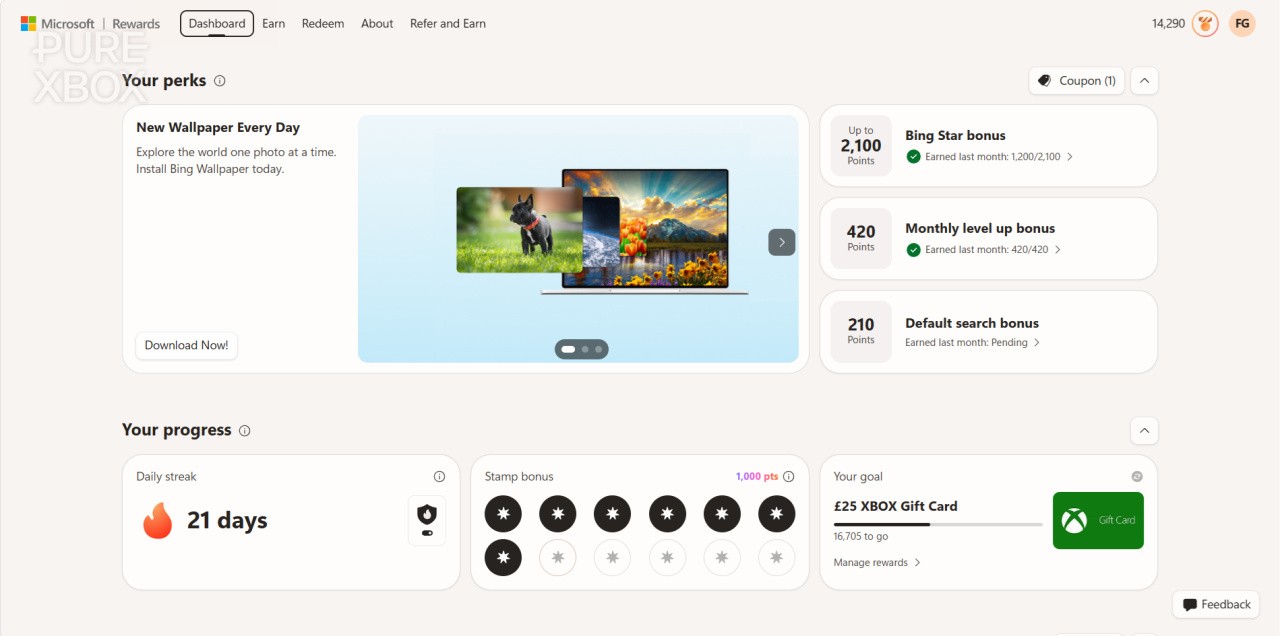
However, that's just changed! Lots of people in the Microsoft Rewards community have been reporting that they've suddenly received the new dashboard over the past day-or-so, and to be honest the reception has been largely negative.
As someone who's been using this dashboard for some time, I wanted to take this opportunity to share five tips that might make your experience easier when wondering how to tackle it all on a daily basis. There's nothing in here that's game-changing , but I do think these quality-of-life tips will add more clarity to the process and hopefully speed it up!
Here are my five tips, and then please let me know if you have any others to share in the comments!
1. If You're On A PC, Use The Microsoft Rewards Sidebar To Track Your Daily Tasks
The image you see at the very top of this article is of the standard Microsoft Rewards dashboard that you'll find by going to rewards.bing.com . However, this isn't necessarily the best way to track your daily tasks, as it's split into multiple sections that don't provide the best clarity on what you need to do and when you need to do it by.
Instead, my suggestion is to search for something basic in Microsoft Bing and then look for the Microsoft Rewards button in the top-right corner. Click that, and you'll see the sidebar that shows your daily streaks, prizes, search suggestions, and basically everything you can do right now to earn more points. This is a much less confusing way to ensure you're ticking all the boxes to earn as many Microsoft Rewards points as possible.
2. The Bing App Is The Fastest Way To Do Your Dailies
The dashboard and sidebar are always worth checking, but it's the Bing App on mobile that's probably the easiest way to do most of your daily tasks. It's basically the same thing as the sidebar, but with a few extra benefits such as a "Read to Earn" section where you can get 30 points per-day for reading various articles, and a set of search suggestions that rarely run out - meaning you can just keep pressing on those instead of manually searching all the time.
Another benefit here is that you can start building a streak for the "Check In" activity that requires you to log into the Microsoft Bing app each day, earning you over 400 points per-month if you keep it up.
3. The "Visual Search" Streak Isn't As Painful As It Sounds
I had no idea what the "Visual Search" daily task was supposed to mean when I first came across it, but considering it nets you another 400+ points per-month if you do it daily, it's worth adding it into your Microsoft Rewards routine.
Microsoft just describes Visual Search as the following:
"Visual Search lets you search the web using an image instead of text. You can use Visual Search to find similar images, products, pages that include an image, and even recipes. Bing will search the web using your image. The search results will include pages that are using the image, related images, and other information."
The way I do it is to visit the bing.com/camera website and click on the Visual Search samples that are in the bottom-right corner. All you have to do is press on one of those, and it'll count for the activity.
Alternatively, you can hit the "Browse" button and use a custom image of your own. Up to you!
4. The Multi-Day "Quests" Are Easy To Miss, But They're Worth Checking For
So, while I'm here telling you that the Microsoft Rewards dashboard is pretty pants and both the sidebar the Bing App are better ways to manage your daily tasks, there's one particular task you definitely do need the dashboard for.
If you go to the "Earn" tab of the MS Rewards dashboard, you'll see something towards the bottom of the page called "Quests". In there, Microsoft occasionally adds 50 or 100-point offers that require you to tick them off across multiple days, and they don't appear on either the sidebar or the Bing app. Be sure to monitor this occasionally to see if anything new has popped up - sometimes you get free subscriptions and other benefits as well from them.
5. Don't Forget To Combine It All With Xbox Rewards!
Hopefully it goes without saying that you shouldn't just do the PC and mobile aspects of Microsoft Rewards if you're an Xbox user! There are so many Xbox tasks you can complete to earn thousands more points per-month, including playing games on console, playing them on PC, checking into the Xbox app and so much more.
The 10,000 point guide I mentioned at the top of the article has details on all of this, and if you happen to be an Xbox Game Pass Ultimate member, you'll benefit the most in terms of potential earnings. The Monthly 4-Pack and 8-Pack challenges encourage you to check out lots of different games as well, and you might discover some gems.
Those are my five tips that I've personally picked up over the past few weeks, but I want to hear yours as well! Let's all help each other to rack up as many points as possible, and maybe we can then all buy GTA 6 for free in November...
 by
by